Sitemap URL Counter – Ways to Find All Pages on Your Site

Sitemap URL counter is a way to count all live pages on a website. A sitemap is a blueprint file of your website’s structure that gives clear direction to the search engine for crawling. This file contains all your website URLs with image URLs.
Submitting a “sitemap.xml” file in GSC is an important step in SEO. This ensures that every web page on your site is crawled and indexed by all search engines’ crawlers.
XML, HTML & RSS Sitemaps For Website
A website owner can use 3 different types of sitemaps for the website.
- XML Sitemaps: The most common type of sitemap used by website owners. They can use this sitemap file for blogs, images, webpages, video, news, and a mobile website. This sitemap contains URL, last updated time, and images in the webpage. Add “/sitemap.xml” after the main page URL to find out the sitemap file.
- HTML Sitemaps: created for users and used by users, search engine crawlers can’t use HTML sitemaps. Users can use this sitemap to navigate on website. This sitemap is displayed on the header section of every webpage for visitors.
- RSS and Atom Feeds: XML sitemap also contains your blogs, but RSS sitemap is specially designed for bloggers. With an RSS feed, you can instantly notify crawlers about your new blog to crawlers.
What is Sitemap Page Counter?
The sitemap page counter helps you determine the exact number of URLs listed in your sitemap on a specific date. This will provide you with a clear view of your website’s indexed content.
Open the tool website page counter in your browser.
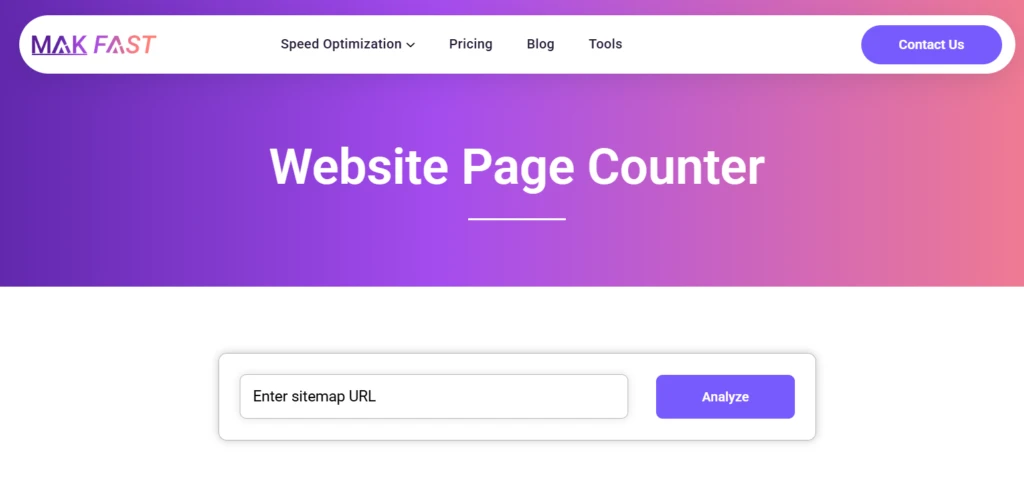
Simply paste a URL with “/sitemap.xml” or “/sitemap_index.xml” and press submit. For example: https://makfast.com/sitemap_index.xml

Now, you can see how many sitemaps this website has and the URL in each sitemap.
Note: Sometimes you may find 404 on “sitemap.xml” webpage, then you can search with “https://example.com/sitemap_index.xml” and “https://example.com/sitemap1.xml”.
SEO Benefits of Using a Website Page Counter
Counting website pages can help you in multiple ways. For example
- You can monitor how many pages are currently indexed and how many are removed.
- Because Google recommends using a maximum of 50000 URLs per sitemap, you can avoid it.
- If you have an e-commerce website, then a sitemap can be a way to organize your products.
- Other than this, you can also check how many pages your competitor has to improve your also.
How to Find the Total Number of Pages on Your Website
As we already discussed, counting the total number of URLs in your sitemap can help in many ways. There are other, more reliable ways to count pages
1. Google Search Console
Google Search Console is another effective tool to count your website pages in more detail. Here, you can maintain, manage, and understand the website page.
To calculate, log in to Google Search Console.
Go to “Sitemap” and submit a website sitemap on the search console.
After submission, Google will take some time to crawl and index your website page.
Here, you can see the number of indexed, non-indexed, and crawl not-indexed pages on one page. Other than pages, this will give you issues with your website.
You can also analyze website traffic, issues with the page, internal linking, website security, user experience, and the page’s position on the search engine.
2. XML Sitemap
Because an XML sitemap stores all your webpages in one place. After your website URL, just type “/sitemap.xml” to find out all the available pages on your site.
Go to the website’s main page, and type “/sitemap.xml” to locate your XML sitemap. Click any site map to see the number of URLs it has.
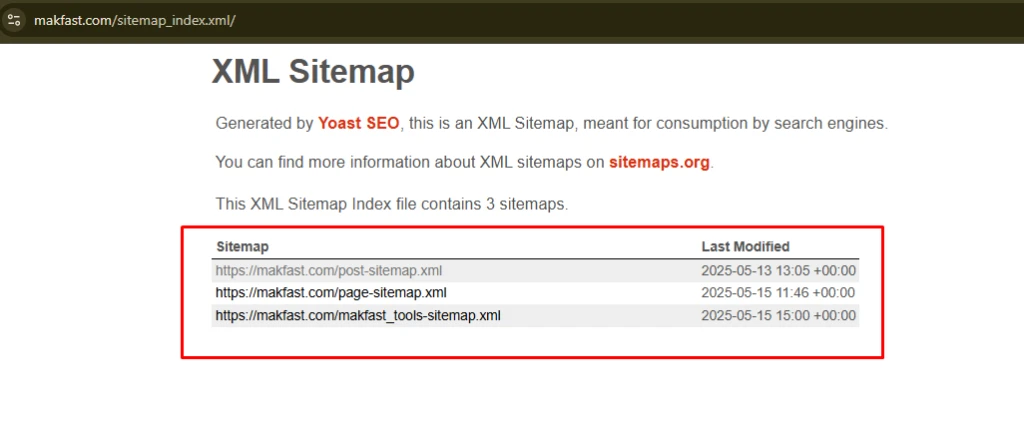
To make it even easier, use our website page counter tool. This tool will give you a list of available sitemaps with the number of URLs.
Directly looking at the website will give you more accurate numbers.
3. Site Search Query on Google
When you are looking for an indexed webpage, then a direct Google search is the best method. Because the XML sitemap file does not provide indexed data. To calculate
Type “site:yourdomain.com” in the Google search bar.
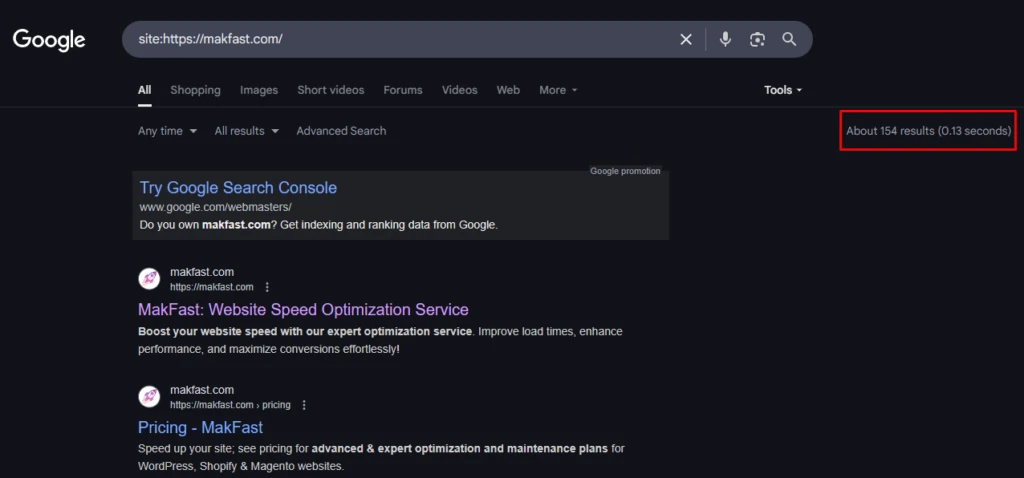
Google will only show you all indexed pages on your website. Add the SERP counter extension to your browser.
Now, you can see the available indexed pages of your website.
Important point: if your website has lots of pages, then this method can be hectic for you. You must check the search console to find indexed pages.
4. Screaming Frog SEO Spider
Screaming Frog’s SEO Spider tool is another way to count your pages. This tool is a free SEO auditing tool to get an in-depth auditing report of your website.
Its free version can calculate 500 URLs at a time. So, to calculate website pages
First, download and install Screaming Frog on your computer.
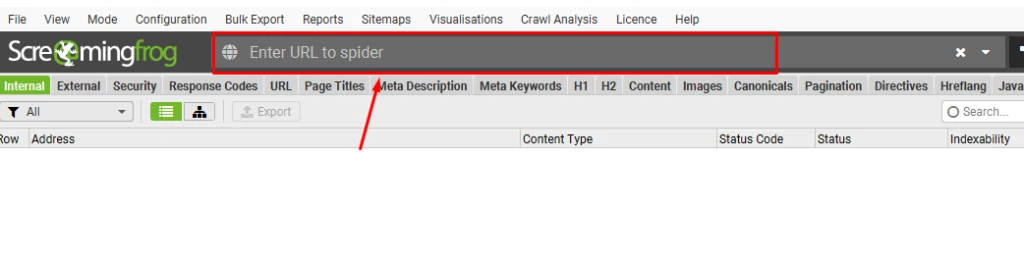
Paste your website URL in the above section of the tool and click Start.
This will take some time to process. Once complete, you can see the number of available pages on your website.
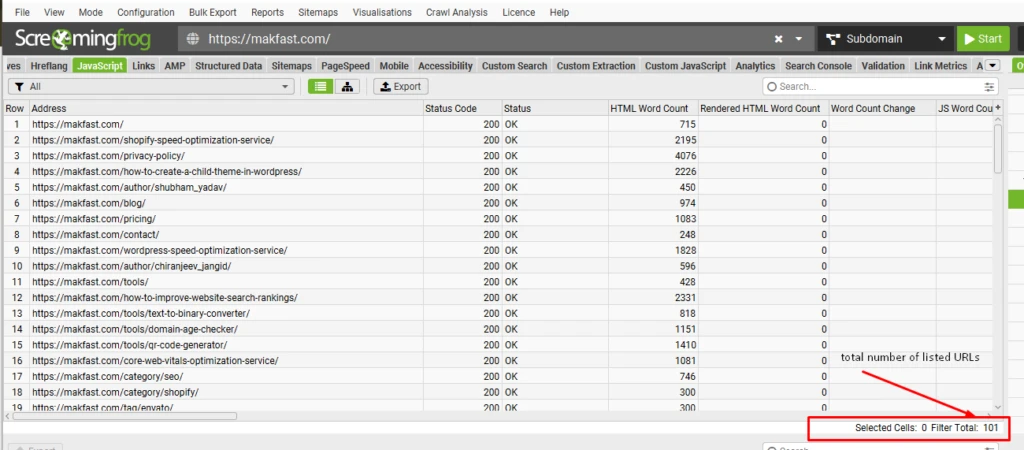
Not only this, Screaming Frog is also useful to analyze page count, broken links, image URLs, duplicate pages, and more.
5. CMS Dashboard (WordPress & Shopify)
If you are the owner of the website, then you can use your CMS platform to find out all available pages. This method is the best for those who want to check the number of created, draft, and published pages.
To calculate website pages, log in to your WordPress or Shopify account
Here, you can’t find all the URLs in one place. There is a different section for pages, blogs, and your product page.
Go to the page section > where you can see published pages as well as draft pages. The same with blogs and product pages.
This could be a long way to find pages, but the only way to know draft pages.
6. Using Site Auditing Tools (Ahrefs & SEMrush)
Use site auditing tools like Ahrefs and SEMrush to count website pages. You can also analyze things like total page counts, crawlability issues, website traffic, and much more.
Log in to the tool like Ahrefs Site and SEMrush
Go to the site audit option and run a full site audit of your site.
Wait a few seconds to get a detailed report of your website. This detailed report includes your website performance, indexing issues, user behavior, website authority, its ranking, and more.
These tools are a good option for ongoing SEO management. If you want to improve your website’s ranking, then using these SEO tools is really important.
These tools are paid but valuable. Small website owners can avoid spending this amount of money.
Common Sitemap Issues and Troubleshooting Tips
Sometimes, you may find some issues with your sitemap, such as missing pages, duplicate pages, and indexing issues. Here’s how to fix it:
- Missing Pages: Check the indexing status of your webpages. For that, you can check the robots.txt file. This file allows access to the search engine crawler and also guides which page to crawl.
- Crawl Errors: Google Search Console is the best way to check for crawling status. Go to the pages section and find out which pages are not indexed.
- Duplicate Pages: If your page count is higher than expected, look for duplicate URLs. To avoid this, you can add canonical tags on the main page.
- Large Site Issues: When you are working on very large websites, you can divide your sitemap into multiple smaller sitemaps.
Regularly monitoring and maintaining your sitemap ensures that search engines can effectively crawl your site, reducing the chances of missed pages.