In fast-growing digital world, apps, websites, and systems are always communicating with each other using something called structured data. One common format for this is XML (Extensible Markup Language). But XML files can get pretty big and messy because of extra spaces, comments, and line breaks that aren’t really needed. That’s where an XML Minifier comes in.
XML Minifier is a free and easy-to-use online tool that makes cleaning up XML files quick and simple. It removes all the extra clutter from your file without changing the actual data, making the file smaller and easier to manage. Whether you’re a developer or just someone working with XML, this tool helps save time and makes things more efficient with just one click.
XML Minify helps to reduce the size of the file. It automatically detects and removes unnecessary space, indentation and newlines. In simple words, it is used to reduce the file size and make the complete code in one line.
You should use an XML Minifier tool to make your XML file smaller and more efficient, which helps us to make the code load faster. If you’re working on a website, application or data project, smaller files mean faster loading and less waiting time for the user. The tool keeps the data safe while cutting out things like space, comments and newlines that are not needed in the file. This saves time, especially when you are sending data over the internet.
Minifying XML files comes with some great advantages. Here’s a simple breakdown:
1. Smaller File Size: It removes extra space, comments and line breaks, so the file takes less space on your computer or server.
2. Faster Loading: Smaller files load quicker than Large files, which is good for websites, applications or APIs where loading speed matters.
3. Better Performance: With smaller file sizes the data loads faster so your web application or system runs smoother and faster.
4. Save Bandwidth: When sending an XML file over the internet, a smaller file uses less internet data, which is chipper and faster.
5. Easier to Store: If you have lots of XML files, minifying them means you need less storage space to store.
6. No Data Loss: The tool removes unnecessary things, so the important information stays safe and secure, and the code works in the same way.
For example, if you’re building a website that uses XML data, minifying the XML data can make pages load faster for the user.
The XML Minifier Tool takes an XML file and makes it smaller without changing the code. The simple steps of how the XML Minifier tool works:
1. Remove extra space: XML files frequently have space, tabs, indentation and line breaks to make them easy to read for people. The tool takes these out because the computer doesn’t need them to understand the file or the code.
2. Deletes the Comments: Sometimes, XML file has comments written by the developers, like <!– This is comment –>. The tool removes them because they are not useful for the file work.
3. Keeps the Structure: It makes sure the tags like (<name> or </name>) and the code inside them stay safe, so the file still works perfectly.
4. Shortness in the File: By cutting out the unnecessary stuff, the tool reduces the file size and makes it faster to load or send.
Using our free XML Minifier tool is so simple, just follow these steps:
Step 1: Open XML Minifier tool.
Step 2: Enter Your XML code or you can upload your XML file by clicking in upload section.
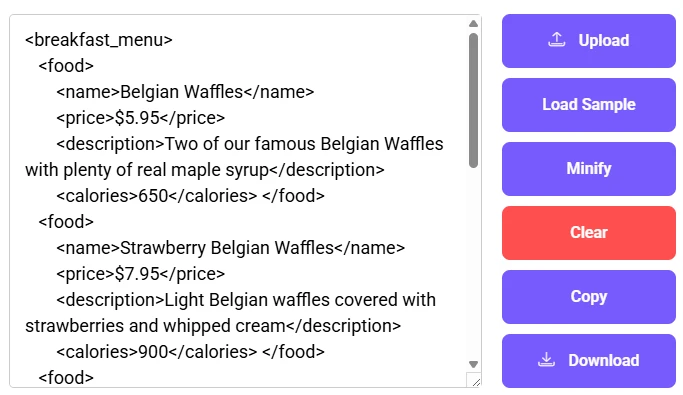
Step 3: After uploading your XML code click on Minify tab and wait for few seconds.

Step 4: Your data is minified by the tool than you have 2 options either copy the data or download the data into XML Minifier format.
Example of XML File:
XML Data
<?xml version="1.0" encoding="UTF-8" ?>
<note>
	<Top_Insurance_Companies>
		<Name>Berkshire Hathaway ( BRK.A)</Name>
		<Market_Capitalization>$655 billion</Market_Capitalization>
	</Top_Insurance_Companies>
</note>
When the using XML Minifier Tool, there are a few things to remember so your data stays safe.
Here are some important factors to remember:
1. Backup your Original File: Always make sure that you have saved a copy of your un-minified XML file before using the tool. If something goes wrong, you can use a backup file to recover your data.
2. Test after Minifying: Once you’ve minified the file, check the minified file in your app or system to make sure it still works the same way. This ensures that no important data was accidentally removed during the minification process.
3. Choose a Trusted Tool: Use a reliable XML Minifier Tool from a trusted source. Some tools might have bugs or not handle special parts of XML data properly, so choose a tool that is secure and has good reviews.
4. Watch for Special Data: If your XML file has unique parts like CDATA sections (<![CDATA[ some text ]]>) or namespace, make sure the tool supports the block of code. Otherwise, your data might get corrupted.
5. Validate the File: Use an XML Validator Tool after minifying to confirm the structure is still correct.
6. Avoid Sensitive Data Online: Don’t upload your private information (like passwords or personal details) while using Online Minifier.
In today’s digital world where every byte matters, the XML Minifier tool is a game changer for developers. It’s an easy and awesome way to make your XML file smaller by kicking out space, comments and newlines without corrupting your data. Whether you are speeding up a website, improving API response, or saving storage space, this tool has your back. It is easy to use, saves time, and improves performance, making it perfect for coders, data analysts, and system managers. Remember to back up your original files, test the result, and choose a trusted tool to keep everything safe. With this XML Minifier Tool, you are not just cleaning up code you are making your projects faster and smoother.
XML stands for Extensible Markup Language, which is a way to store and share data using custom tags like (<name> or </name>). It’s like a flexible organizer for information that both people and computers can read.
For example:
<?xml version=”1.0″ encoding=”UTF-8″?>
<note>
<to>Tove</to>
<from>Jani</from>
<heading>Reminder</heading>
<body>Don’t forget me this weekend!</body>
</note>
It is used in websites, applications, and data storage because it’s clear, structured and works everywhere. XML focuses on holding and organizing data.
No, XML minifying doesn’t affect its functionality. When we use Minify an XML file, the tool removes extra things like space, comments and newline, but it keeps the important parts safe like tags and the same data.
For example:
Original:
<?xml version=”1.0″ encoding=”UTF-8″?>
<note>
<to>Tove</to>
<from>Jani</from>
<heading>Reminder</heading>
<body>Don’t forget me this weekend!</body>
</note>
Minified:
<?xml version=”1.0″ encoding=”UTF-8″?><note><to>Tove</to><from>Jani</from><heading>Reminder</heading><body>Don’t forget me this weekend!</body></note>
The structure and the meaning of the code is same and the functionality of blog is working properly and faster.
Yes, most XML Minifier Tools can handle large XML files, but it depends on the tool. Reliable ones can process files that are in megabytes or even gigabytes big without trouble. They’re working like a quick scanner and remove extra spaces, comments, and line breaks, no matter the size of the file.
No, minifying XML doesn’t remove essential data. It only takes out non-essential stuff like spaces, commands, and newlines – things that make the file readable for humans but aren’t needed for it to work. The important parts, like tags (<title>) and the data inside them, stay unchanged.
Original:
<title> my code </title>
Minified:
<title>my code</title>
No, minifying your XML file will not affect its functionality. Our tool only removes unnecessary whitespace and comments, preserving the data and structure

