How to Check When a Website Was Last Updated – Easy Steps

Search engines always support fresh and relevant content. A regularly updated website will give more credibility, engagement, and trust. But how can you find out whether the information is updated?
Here, we will discuss a few of the most effective methods for checking the last modified date of a particular webpage.
What Are the Different Dates Associated with a Web Page?
A webpage has 3 main types of associated Dates that are published, last updated, and indexed.
So, understand what they are
Published Date: This is the original date when the content was first posted online. It shows when the page was made available to the public for the first time.
Last Modified Date: This is the last updated date of the webpage. Whether you are doing a small edit or a complete rewrite, the page will show as modified, and that will reflect in your date. Regular updates are considered a ranking factor in search engine results pages (SERPs).
Indexed Date: Every time you publish or modify a web page, search engines like Google, Bing, and Yahoo will crawl it again and, if they do, they update the indexed date accordingly.
Simple Ways to Check the Last Updated Date On a Web Page
There are many ways available. Let’s discuss one by one:
1. Using Source Code
The source code is one of the reliable ways to find the last updated date of any webpage. This method is especially useful if the visible content doesn’t display an updated date or you want to confirm its date.
Step 1: Open the Webpage:
Open any webpage in any modern browser (like Chrome, Firefox, or Edge).
Step 2: Open Developer Tools or View Page Source:
You have two options to view the source code.

- Option 1: Right-click anywhere on the page and choose “View Page Source.”
- Option 2: Press Ctrl+U (Windows/Linux) or Cmd+Option+U (Mac).
Step 3: Search for Timestamps
You will be redirected to the developer page. Now, press Ctrl+F (or Cmd+F) to search for common keywords like “datePublished” or “dateModified”.
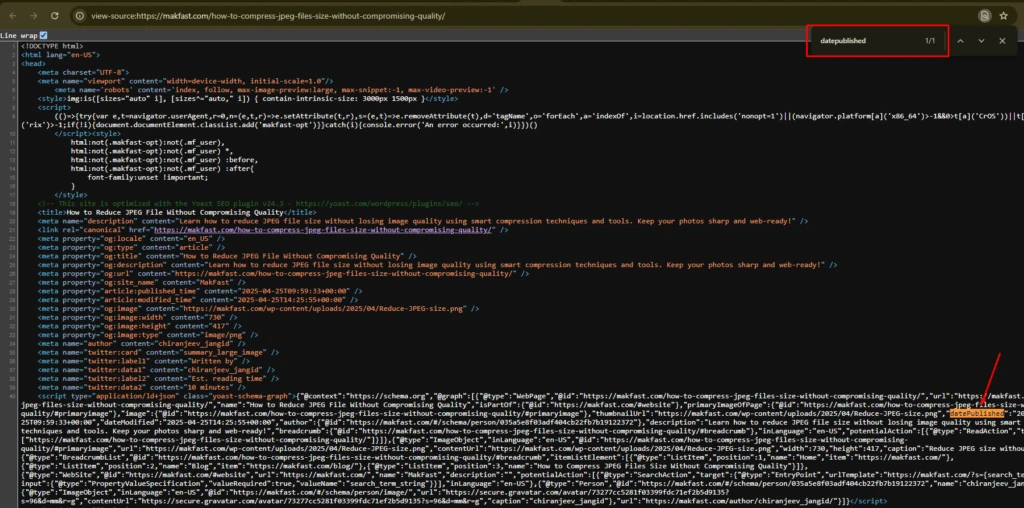
The webpage date is available in the meta tags. Here, you can see the modified date and published date of the webpage.
2. Use HTTP Headers
If you did not find a modified date or published date on the view page source, then you can also check the HTTP response headers. The HTTP header contains all the useful information about the webpage and its content.
For this, search for the HTTP header checker.
Then paste the URL in the given box and hit the check button.
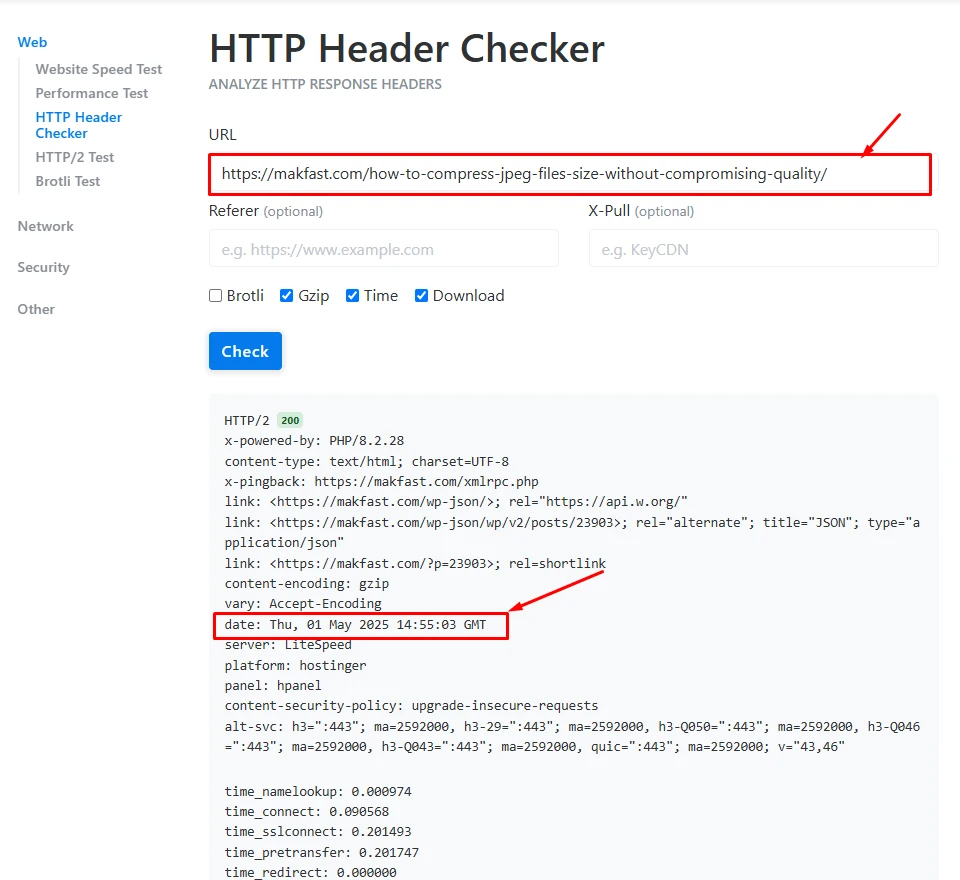
Here, you can find the modified date & published date of that particular webpage. This is most another simple way to find out last updated webpage.
3. Checking Sitemap to See Last Update Date
A sitemap contains all the available webpages on the website with their URL, modified date, and image count. Website owners need to submit sitemaps for search engines like Google, Yahoo, or Bing. This gives a clear roadmap of the website to crawl and index webpages.
Anyone can access a website’s sitemap by using

1. https://example.com/sitemap.xml
The most common way to find out the location of the sitemap page.
2. https://www.example.com/sitemap_index.xml
If there are multiple sitemaps, then this index file contains all the available sitemaps.
3. https://www.example.com/blog/sitemap.xml
When a website is divided into multiple sections, like blog, product, or service.
Open the Sitemap in the Browser. Each sitemap contains entries like URL, images, and the last updated date.
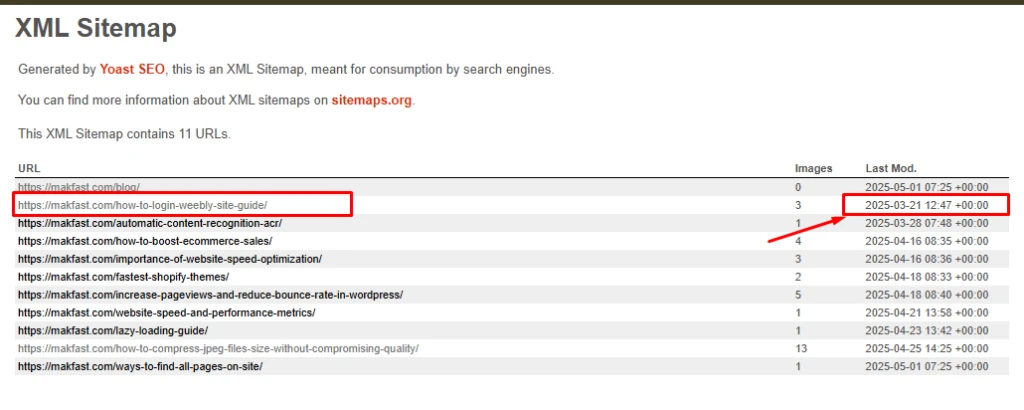
This means the last update to that page was on March 21, 2025.
By checking a sitemap, you can
- Verify the last updated time of a webpage
- See the new update on the website
- Cross-check freshness if no visible date is on the page
Checking on different websites might not give you accurate data. But the sitemap’s tag gives you a reliable clue about when the page content was last changed.
4. Using Google Search
Searching on Google for the particular webpage can also provide its last updated data. Google stores cached versions of every web page, and these caches will reflect the last time Google crawled the page.
What you can do
Add “Site:” before the URL. This also provides which URL is indexed by the search engine and which is not.

You can check the date below every title.
If you have not found the indexed date of all the search results, then you can add a simple code “&as_qdr=y15” at the end of the search URL.
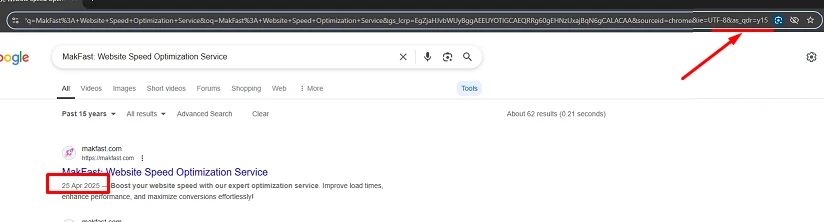
This method is really quick but doesn’t provide an accurate modified date. Because Google may take 1 hour to a few days to crawl the webpage.
5. Checking Internet Archive For Last Update Date
The Internet Archive’s Wayback Machine is a digital archive. This machine regularly takes snapshots of web pages over time.
Enter a webpage URL into the Wayback Machine to see historical versions of a page at that time. This will help you to find out new updated information than the previous one.
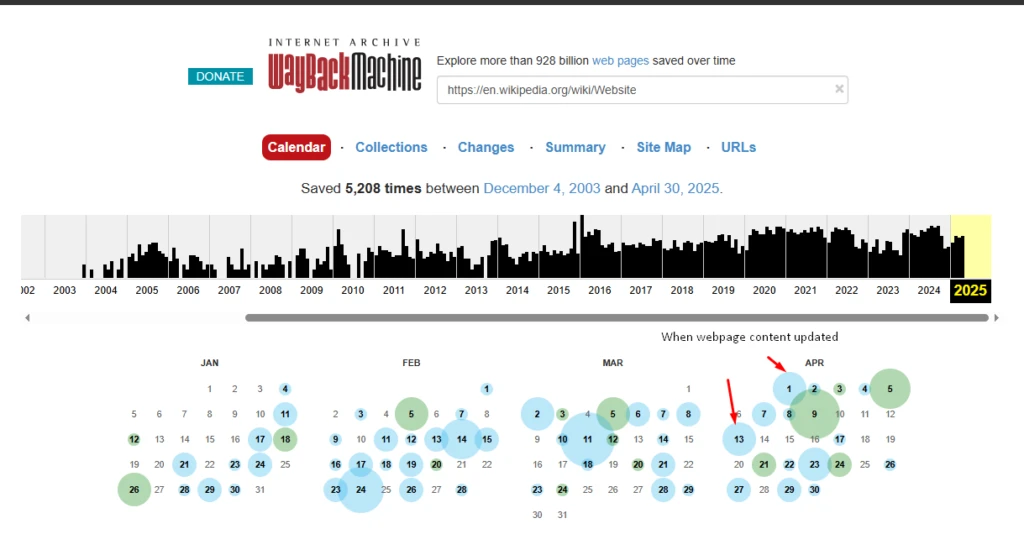
This method is useful when the webpage itself does not show updated information or when you want to verify changes over time. This snapshot method is not as effective as code view source or XML methods.
6. Use a JavaScript Command URL
Every webpage has built-in metadata that browsers can access. One such property is the document’s lastModified. This will showcase the last modified date of the HTML document on the server.
You can retrieve this information instantly with just a simple JavaScript command in your browser’s developer tools.
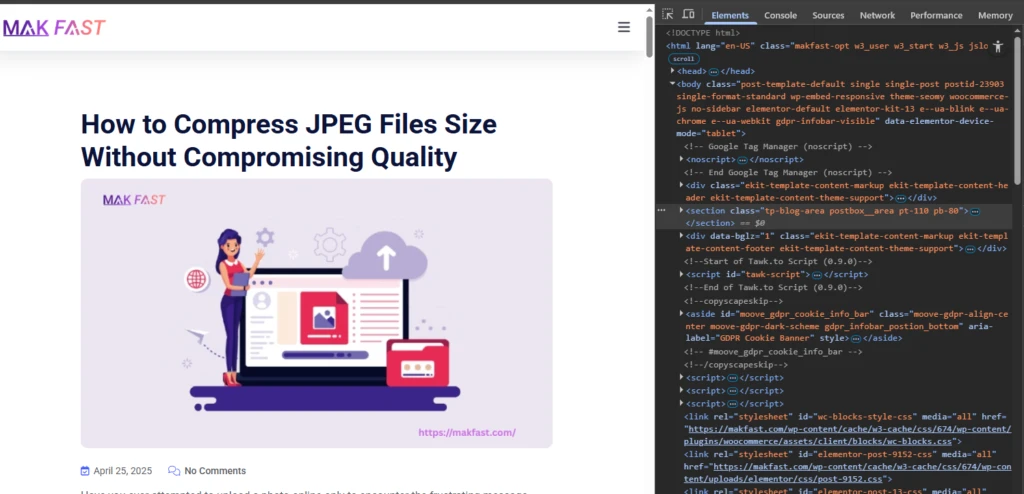
Open the webpage you want to check, then press F12 (or right-click and choose “Inspect”).
Use the CTRL+F key and paste the keyword “document.lastModified” into it.
But keep in mind, this value can be wrong. Websites that use dynamic JavaScript frameworks (like React or Angular) may return the current time or nothing meaningful.
7. Check the Below Headline For Blogs
If you just want to check the last modified date of blogs, then you can check the updated date just below the titles.

This option is not available for website pages, that why we use various methods for different pages.
Conclusion
There are different ways to check when a website or webpage was last updated. Other than the above-discussed methods, you can use different SEO tools and Chrome extensions to find out the last updated date.
The simplest way to find out the last modified date is to search on a search engine. Just put this simple code “&as_qdr=y15” at the end of the search URL. The most accurate way is to check the sitemap.xml file or the page source code.